
Introduction
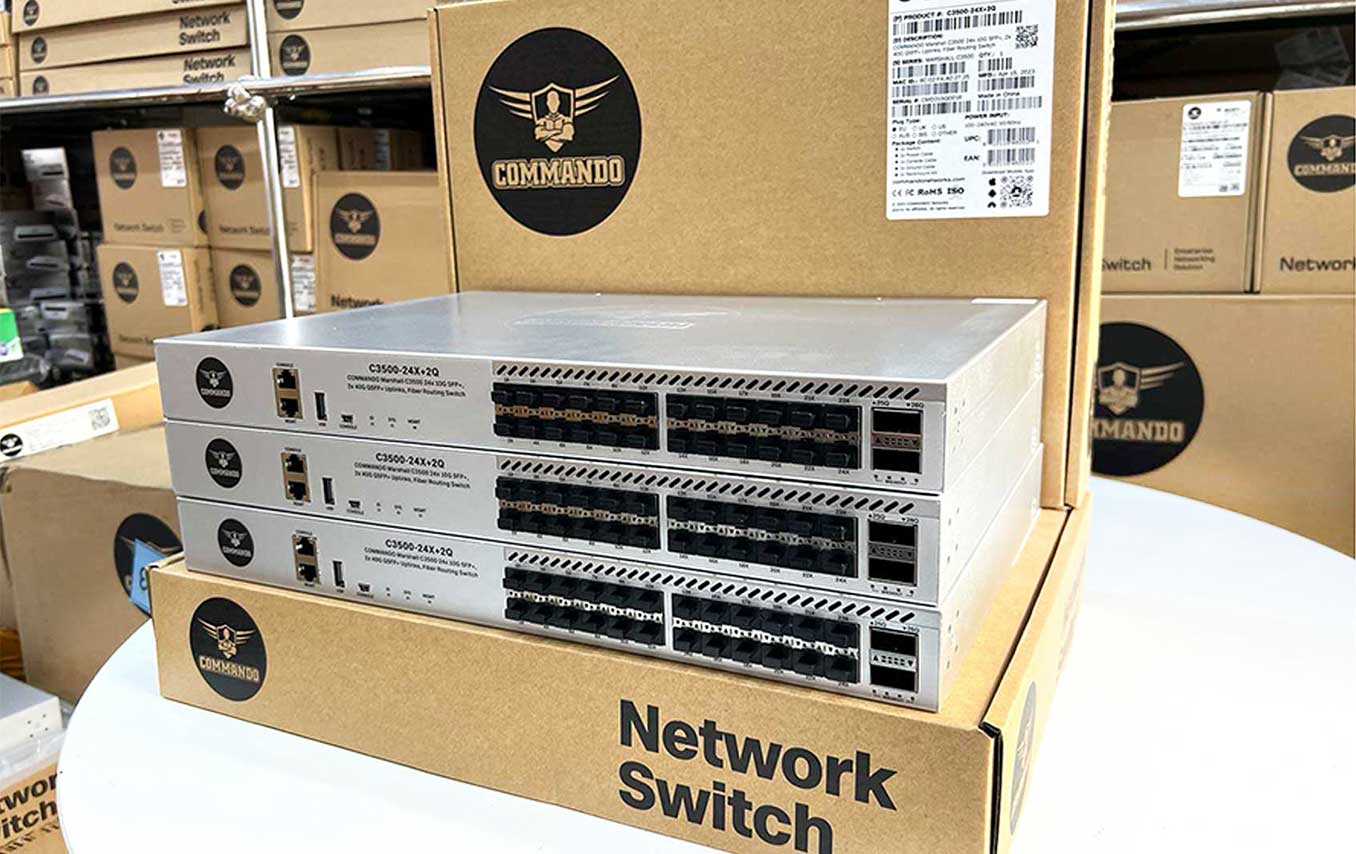
COMMANDO Marshall C3500 Series switches are L3+ Core & Data Center Series Modular Routing Switches which are fully managed having 1, 10, 40 & 100 Gigabit Ethernet Small Form-Factor Pluggable (SFP, SFP+, QSFP+, QSFP28) switch ports with perpetual PoE/PoE+ or Non PoE models having 10G fiber/ 10GE copper fixed uplinks as well as modular uplink ports aong with physical stacking up to 16 switches, perpetual PoE/PoE+ for no power downtime for network resiliency & high availability, delivering robust performance & intelligent switching for growing networks. This series switches are easy to deploy, use, manage & designed exclusively for enterprise-class core & aggregation layer data center switches, specially built for Security, IoT, & Cloud networking needs of growing businesses, data centers & high-end campus networks.
It has high performance 100G / 40G / 10G / 1G switches designed based on COMMANDO’s sixth generation Ethernet switching technology with Carrier Grade high-performance which helps it to meet the requirement of Metro/Enterprise/Data Center/HCI networks. COMMANDO Marshall C3500 meets the requirements of next generation Enterprise, Data Center, Metro & HCI (Hyper-Converged Infrastructure) networks which includes VRRP, VRRP load balancing, BFD for VRRP, BFD for BGP/IS-IS/OSPF/Static route, MPLS L2 & L3 VPN, BFD for VXLAN, Segment Routing (SR), QoS Traffic classification based on Layer 2, Layer 3, Layer 4, & priority information Actions including ACL, CAR, & re-marking, Queue scheduling modes such as PQ, WFQ, & PQ+WRR, Congestion avoidance mechanisms, including WRED & tail drop, Traffic shaping, O&M Network-wide path detection, SNMPv1/v2c/v3, Zero Touch Provisioning (ZTP), 802.1x authentication, RADIUS & TACACS+ authentication for login, DoS, ARP, MAC address attacks, broadcast storms, & heavy-traffic & ICMP attack defenses, Remote Network Monitoring (RMON).
It can be deployed in harsh environments to deliver hassle free mission-critical services for next-generation, high-performance core networking setup designed for data center networks & high-end campus networks. It also provides stable, reliable, & secure high-performance Layer 2, Layer 3 & data center switching capabilities to help build an elastic, virtualized, & high-quality network. VXLAN to build a non-blocking large Layer 2 network, which allows for large-scale VM migration & flexible service deployment. These switches support comprehensive virtualization capabilities along with data center service features can also be used for surveillance requirements.
The switches come with Modular uplinks, 1, 10, 40 & 100 Gigabit (SFP, SFP+, QSFP+, QSFP28) Fiber Network Module as well as 1GE/10GE Copper Network Modules & are latest development of Gigabit Layer 3 Core & Data center Switch with up to 100G Modular uplink, Intelligent managed Switches designed for networks requiring High performance, High port density, High uplink b&width, Flexibility, Fault Tolerance, & Advanced Software features for maximum Return on Investment (ROI). These switches have Security features, & advanced Quality of Service (QoS), ideal for all organizations considering reliable, affordable & advanced Core & Data center feature with CLI & Web managed, Advanced PoE/PoE+, Scripting capabilities & Layer 3 routing, Automatic MDIX & Auto-negotiation on all ports select the right transmission modes (half or full duplex) as well as data transmission for crossover or straight-through cables dynamically. It can save up to 58% of power consumption, making it an eco-friendly solution for your business network. Switch models are designed for stacking switches as a single virtual switch, enabling customers to have a single management plane & control plane for up to 768 access ports. With full PoE/PoE+ capability, power & fan redundancy, stacking b&width up to 3456Gbps, Modular uplinks, Layer 3 feature support, & cold patching for the digital workplace, these are optimized for today’s data center surveillance, mobile & IoT needs. These switches are powerful & flexible enough for users to deploy wireless access points, surveillance cameras, IP phones & other PoE/PoE+ supported devices over longer distance up to 250 meters. It provides easy device rack & wall mounting, on boarding, configuration, monitoring, & troubleshooting. These fully managed switches can provide Layer 3 Core & Data Center features as well as supports IEEE 802.3af-compliant PoE (Power over Ethernet) & 802.3at-compliant PoE+ (Power over Ethernet plus). Each switchport is capable to deliver either 15.4 W PoE or 30 W PoE+ power on all ports. PoE/PoE+ capable models provide power across all access ports for wireless APs, security cameras, & other IoT devices with power budget up to 2400W. Designed for operational simplicity to lower total cost of ownership, they enable scalable, secure, & energy-efficient business operations with intelligent & automated services. These switches come with lifetime free software upgrades & patching to enhance features & supports patching, which provides fixes for critical bugs & security vulnerabilities between regular maintenance upgrades. This support allows customers to add new features & upgrades without having to pay a single dollar.
It offers robust QoS, to optimize traffic on your Business Network, these switches provide (Port-based/802.1p/DSCP) QoS to keep latency-sensitive video & voice traffic jitter-free moving smoothly. Additionally, port-based, tag-based VLAN, Voice VLANs can improve security & meet more network segmentation requirements. This series switches also have provisioning of QOS, Static routing, IPV6 features. Moreover, with its innovative energy-efficient technology, can save up to 58% of power consumption, making it an eco-friendly perfect solution for your business network.
Management Access Modes
COMMANDO Marshall advanced IP services, Data center routing switches Management is made easy via a industry-st&ard command Line Interface (CLI) via Console/Telnet/ETH port or web-based Graphical User Interface (WEBUI) access via HTTP/HTTPS with administration traffic protected via , SNMP v1/v2C/v3, SSH v1/v2, RMON v1/v2 which enables the switch to be polled for valuable status information & allows it to send traps when abnormal events occur.
Remote Manageability
Remote management is the process that allows the administrators to take full control of all operations using a remote. This remote management via WEBUI / Telnet/ SSH/ HTTPS will reduce time & money spent on management & maintenance & physical presence of Network Engineer.
Management by CLI - Console, Telnet (RFC854) up to 8 sessions.
Management by WebUI- HTTP, HTTPS for management Based on Remote Configuration & maintenance Using Telnet.
In this CLI guide we will underst& Management by command Line Interface(CLI) through console port, telnet & ETH out of b& management mode.
Accessing the C3500 Switch via console port
How to Login COMMANDO Series C3500 via console port?
The console interface is used by connecting the Switch to an VT100–compatible terminal or a computer running an ordinary terminal emulator program (e.g., the HyperTerminal program included with the Windows operating system) using an RS–232C serial cable. Your terminal parameters will need to be set to: VT–100 compatible with 115200 baud. Users may also access the same functions over a Telnet interface. Once you have set an IP address for your Switch, you can use a Telnet program (in VT–100 compatible terminal mode) to access & control the Switch. All of the screens are identical, whether accessed from the console port or from a Telnet interface.
Step 1 : Connect the Switch console port with PC/Laptop via console cable.

Fig-1. Connection of console port with PC/Laptop via console cable.
Step 2 :The communication parameters configuration of the Putty Terminal with console is shown below Baud rate (Speed):115200.
Step 3 : Click on “Open”. You will get following window.
With the console port properly connected to a management computer, the following screen should be visible.

Fig-2. Putty configuration in PC for console port access

Fig-3. COMMANDO Series C3500 Switch CLI access via console port
How to Login COMMANDO Series C3500 via Telnet?
Before Accessing Switch via telnet you have to ensure you are connected to C3500 Switch.
Users access CLI through TELNET
Following are the steps to access CLI via telnet.
Step 1 : Connect the LAN port of PC/Laptop with any Ethernet port of the switch by LAN cable.
Step 2 : The communication parameters configuration of the Putty Terminal with TELNET is shown below:IP Address: 192.168.1.1 & Port: 23

Fig-4. Putty configuration in PC for telnet port access
How to Login COMMANDO Series C3500 WEB GUI?

Connect any Ethernet port to your system (PC/Laptop) with RJ45 LAN cable.
Fig-5. COMMANDO Series C3500 Switch port connected with PC via RJ45 LAN cable.
In PC following LAN setting required like Open Network & sharing center, Click change Adapter settings, Double click on Local Area Connection, Click Properties, Double click on Internet Protocol Version 4(TCP/IPv4) option & set default IP as shown below.
IP Address: : 192.168.0.(2-254) , Subnet Mask: 255.255.255.0, Default Gateway: 192.168.0.1
Note:
You can change access IP & password as per requirement.
Now Open any web browser type http://192.168.0.1 & hit “Enter” following window will appear.

Fig-7. Local Area Connection properties for Web Interface
Use following login details to enter in WEBUI mode,
Username: admin & Password: admin
Recommendations: It is strongly recommended to change all default username & passwords.
Preface
1.1 Declaration
This document updates at irregular intervals because of product upgrade or other reason.
This document is for your reference only.
1.2 Suggestion feedback
If you have any questions when using our product and reading this document, please contact us:
Email: support@commandonetworks.com, info@commandonetworks.com
1.3 Audience
This document is for the following audiences: